In the first half of this year, we worked with a private-label apparel company that launches new styles every week. Over a year, that adds up to hundreds of Excel order forms.
That isn't a sign of poor management. It's simply how the path from design to warehouse grows in the apparel business.
How many files does one style pass through?
Before a new style reaches the shelf, it goes through roughly five stages: design, ordering, manufacturing, shipping and receiving. Every stage produces its own forms, and no two forms look quite alike.
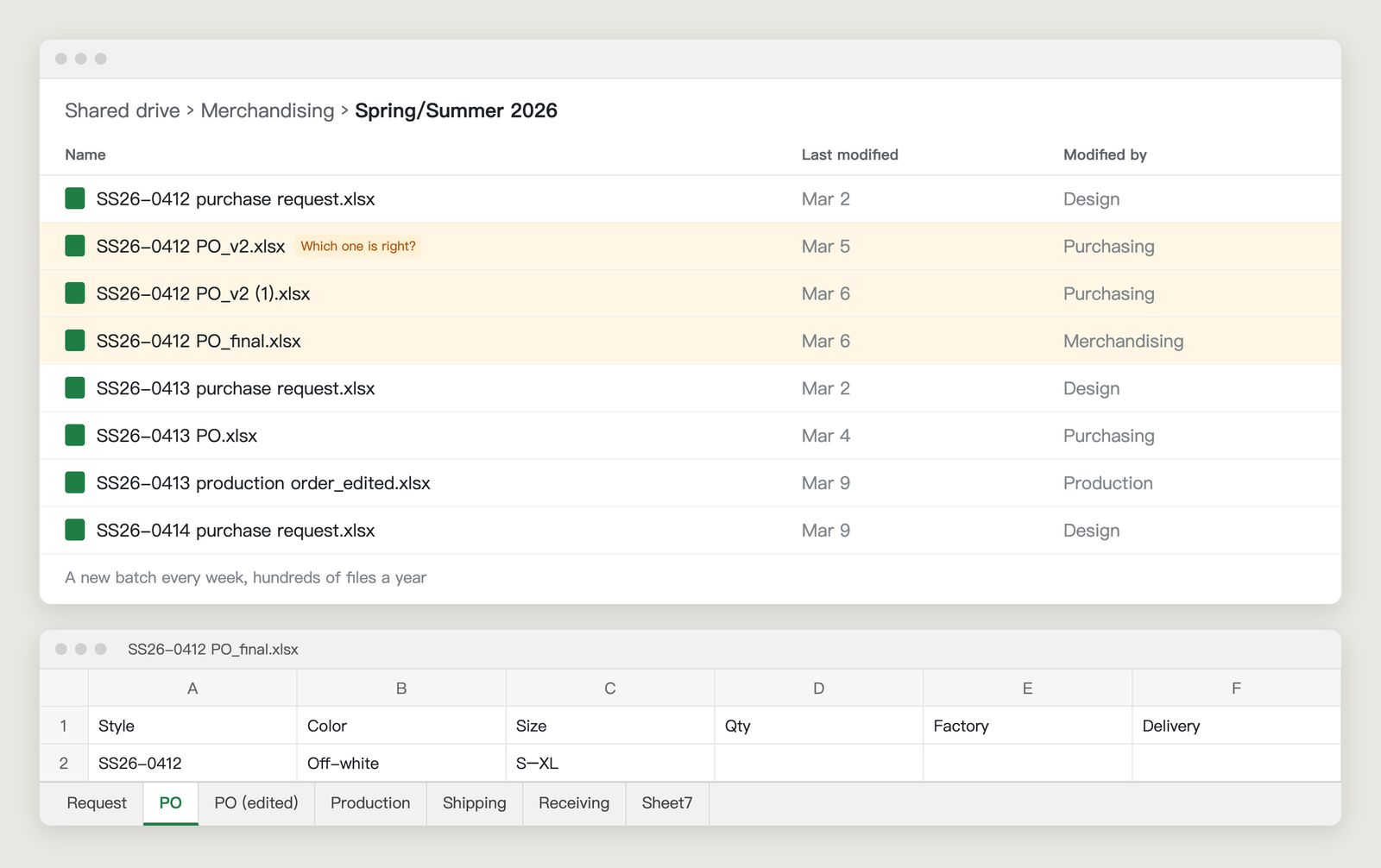
Some companies still use paper forms, and someone keys them into the ERP one by one at the very end. Others have gone digital, but in Word or Excel: one form, one file. To separate stages such as purchase requests and purchase orders, a single style often ends up split across several files, or across several tabs in the same workbook.
Our client was in the second group. Their files lived on a shared drive, each style took two or three files with several tabs apiece, and at the end someone keyed it all into the ERP by hand.
New styles every week means a new batch of files every week. Whether the right file and the right tab were used depended entirely on people, and opening the wrong one caused trouble further down the line.
Why not just build a system?
With this many files, the obvious answer is to build a system. The trouble is that most private-label brands don't have an in-house IT team, and many of the fields on these forms keep changing: new fabrics, new size ranges, new suppliers, new production steps. A hard-coded system needs constant changes, nobody is there to make them, and everyone drifts back to Excel.
Excel is flexible, but the costs are clear:
- Getting it right depends on people. Anyone can open and edit anything on a shared drive, and a wrong file or a wrong tab often isn't caught until much later.
- The same data gets keyed in several times. What's on the purchase request is copied onto the purchase order and then keyed into the ERP by hand, and every copy is another chance for a mistake.
- Operating and maintenance costs are high. Hunting for files and tabs and reconciling numbers eats up time at every stage, and when a template needs to change, no one can update every copy cleanly.
This is exactly what AI agents are good at
The data along this path is half structured and half not. Style numbers, quantities and unit prices are fields. Paper forms, factory replies by email, quote attachments, and messages and photos sent over LINE come in every unstructured form imaginable.
Traditional systems handle the first kind well and the second hardly at all. People can handle both, but not at this volume. AI agents fit the work in between: pulling structured and unstructured data together and tying it back to the right form and the right style.
Our approach: keep the ERP, wrap a layer around it
Our client kept their ERP. We built a layer around it: staff work in an easy-to-use web interface and app instead of digging through the shared drive, and nearly all the work of connecting and processing data in between is handled by ProCheck.
In ProCheck, that work goes to ProAgent, an AI worker. Applied to an apparel brand's design-to-warehouse path, here is roughly what it can take on.
Learn the business first
It starts by reading the company's existing form templates, past files and ERP fields, and builds a business knowledge model (ontology) of how styles, colors, sizes, materials, suppliers and delivery dates relate to each other. When it finds an abbreviation it doesn't understand or a field that doesn't line up, it lists them and asks someone instead of guessing.
One style is one case, not a stack of files
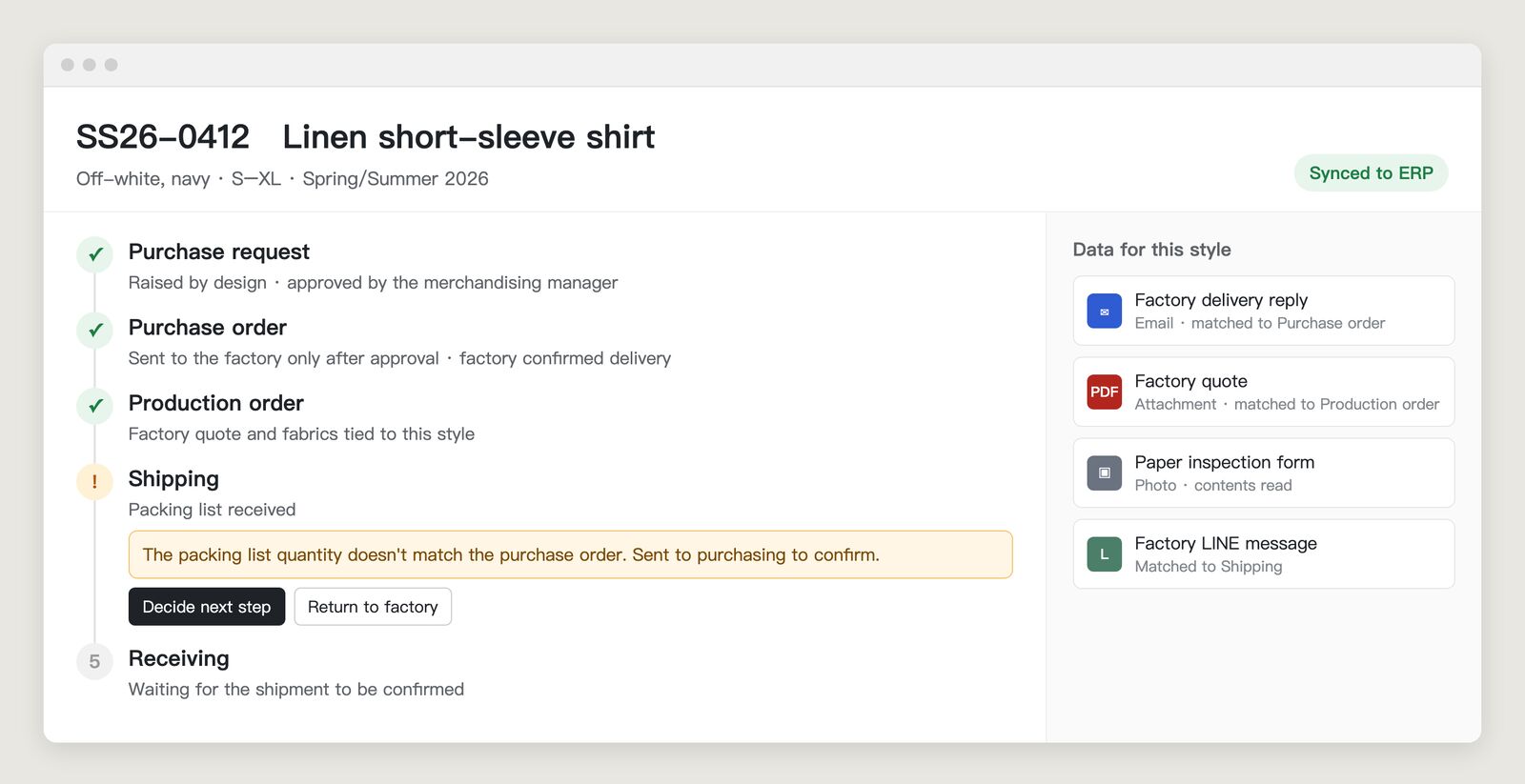
Purchase requests, purchase orders, production orders, shipments and receiving all become steps on a single case timeline. There's no need to split them into separate files or tabs, so there's no wrong file to open. Every change, who made it and when, stays with the case.
Tie scattered data back to the right form
Photos or scans of paper forms, factory replies by email, quote attachments and LINE messages are read, matched to the right style number and process step, and filed into the case.
When the values change, the system doesn't have to
New fabrics, new size ranges and new suppliers don't have to wait for someone to change code. Managers' corrections and confirmations become its experience, and nothing is remembered until a person has confirmed it.
Flag what doesn't match
It checks purchase quantities, production orders, packing lists and received quantities against each other, and hands anything that doesn't match to the person responsible.
The rules sit right in the path
A purchase order that hasn't been approved never reaches the factory. Anything over budget, and any last-minute change to an order, needs sign-off from the right manager. ProAgent can submit for approval, but it can't decide on anyone's behalf.
No more keying data into the ERP
Forms completed in the web interface or app are passed into the ERP by ProCheck. Nobody has to key them in one at a time anymore.
Where people stay in the loop
None of this means handing the process over to AI. Which factory gets the order, whether to accept a delayed delivery date, what to do about quantities that don't match: those decisions stay with people. What it takes on is the work that used to eat the most time and invite the most mistakes: finding files, copying data, keying it in and reconciling numbers.
If you're evaluating AI agents, our guide for small and midsize businesses lists the questions worth asking before you sign off. For other adoption cases in retail and consumer goods, see Retail & consumer brands.
Start with one process
You don't need to replace your ERP, or change everything from design to warehouse at once. A more practical approach is to pick the most painful stretch, such as purchase orders through factory replies, let an AI worker learn your business there and get it ready to go live, and then extend from there.
If your team spends its days hunting through hundreds of Excel files for the right file and the right tab, get in touch.